What is WooCommerce All About (25+ FAQs Answered)

Last Updated:
Do you need more information on what is WooCommerce? If you’re looking to know more about WooCommerce and its features, keep reading this article!
You have an eCommerce store, want to convert your brick-and-mortar store to an online store, or are just learning to start an online business. This article has you covered!
This blog will discuss a powerful and versatile platform that empowers entrepreneurs to build and manage online stores, WooCommerce.
According to statistics, this platform runs 39% of the eCommerce market websites. This is quite an impressive number for us to entrust our online business, starting with WooCommerce.
However, understanding WooCommerce is impossible. That’s why we’ve compiled this comprehensive guide, which answers over 100 frequently asked questions about WooCommerce.
We’re excited to share the questions we’ve gathered from our engaging WooCommerce user communities! This article is designed to provide you with everything you need to know about WooCommerce and to help you tackle those challenging problems you might face.
Let’s review our extensive FAQ list and equip ourselves with the knowledge to succeed in online retail!
What is WooCommerce?
Getting started with WooCommerce is an exciting venture for anyone looking to launch an online store within the WordPress website, and understanding the basics can set you up for success.
WooCommerce is a popular open-source eCommerce plugin for WordPress. It’s free to use, customize, and modify according to specific needs.
By using WooCommerce, you can:
- Product Management: WooCommerce allows store owners to add unlimited products to their websites, including physical goods, digital downloads, and subscriptions. It provides an easy-to-use interface for adding product details, pricing, images, and variants.
- Payment Integration: This feature allows store owners to accept multiple payment gateways, such as PayPal, Stripe, credit cards, bank transfers, and more.
- Shipping Options: This option provides flexible shipping settings, such as flat rates, free shipping, local delivery, and real-time shipping calculations.
- Fully Compatible: It integrates seamlessly with WordPress themes and plugins, allowing you to manage and customize your store’s design without knowing how to code.
- Analytics and Reporting: Offers built-in analytics for sales, customers, and store performance.
With some patience and creativity, you’ll be well on your way to crafting a successful eCommerce business using WooCommerce.
Whether selling handmade crafts, digital downloads, or retail products, this platform is tailored to help you thrive in the online marketplace.
Manage WooCommerce in the WordPress Dashboard
We all know WooCommerce is a WordPress plugin, so we should look closer at the WordPress admin dashboard to set up a WooCommerce store before starting.
Install and activate WooCommerce. It is the core of any plugin for running your online store and has some cool features.
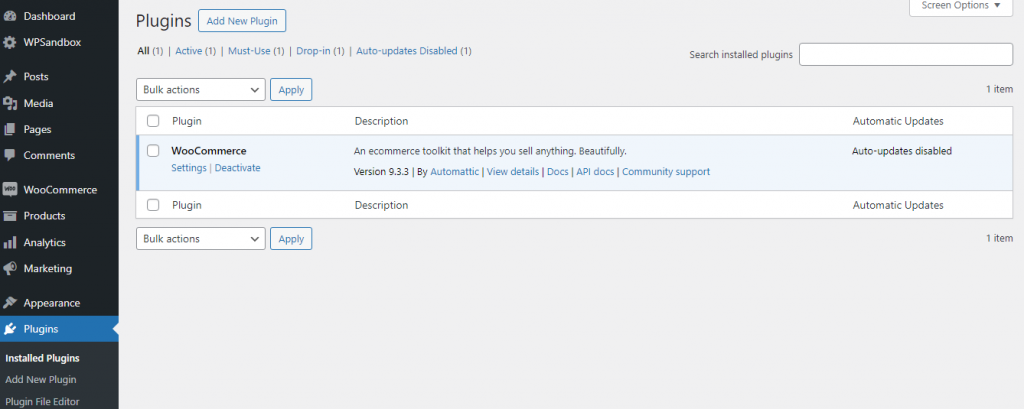
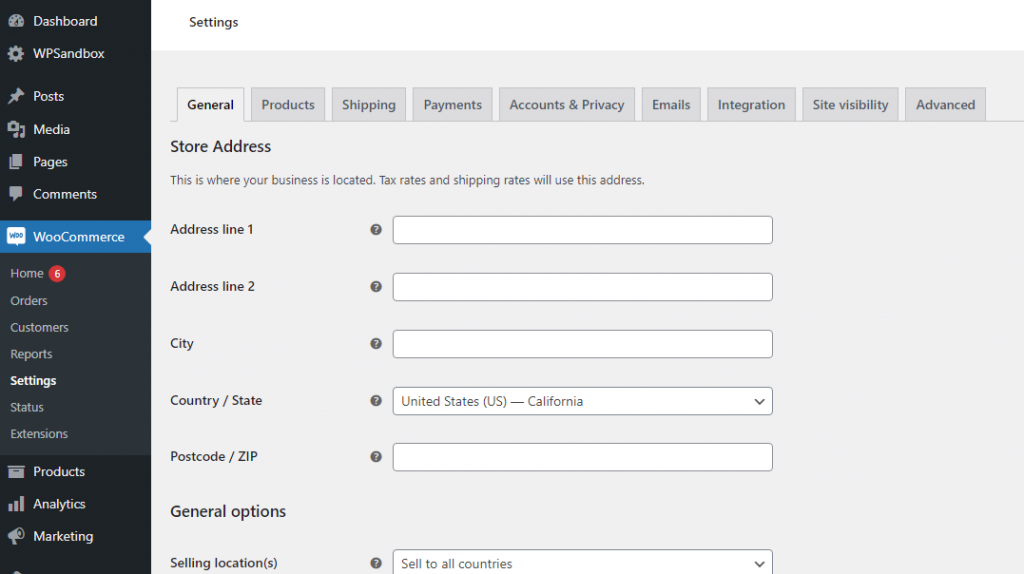
Navigate to the WooCommerce section. Follow the instructions to configure your online store, such as integrating with the theme, adding products, providing general information about your store, setting payment methods, and so on.
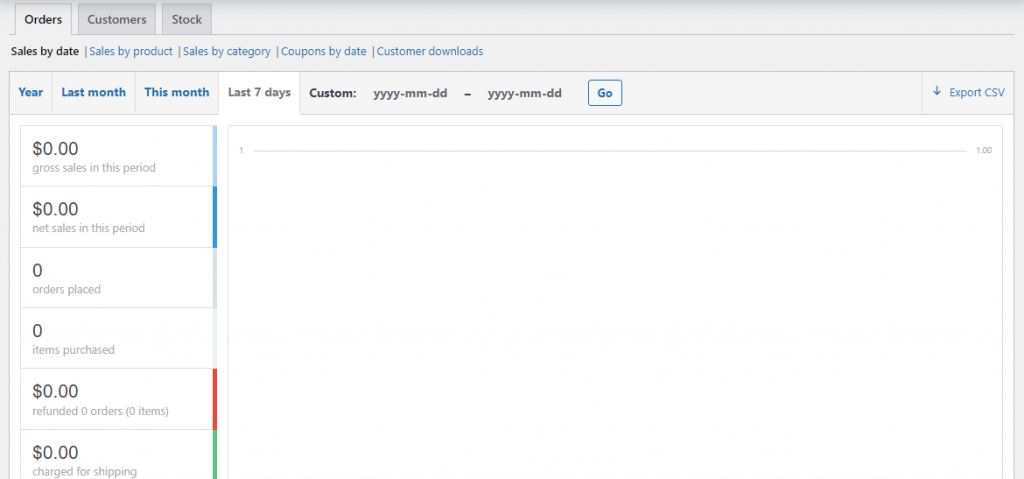
With WooCommerce, you can easily monitor your order history, customer data, stock levels, and revenue—all in one handy report analysis table!
Frequently Asked Questions All about WooCommerce
As mentioned, we’ve compiled this question list from some WooCommerce communities. Let’s see what they’re concerned about when developing their WooCommerce store.
Are you planning to start multiple eCommerce stores on WooCommerce WordPress?
I am confused about choosing a lightweight, easy-to-manage, responsive, and Elementor-supported WooCommerce theme.
The answer comes from a professional with extensive experience designing websites. They have worked on many clients’ projects and achieved certain successes.
They have suggested themes like Woodmart, Porto, XStore, Flat, Martfury, etc.
The answer comes from a professional with extensive experience designing websites. They have worked on many clients’ projects and achieved certain successes.
They have suggested themes like Woodmart, Porto, XStore, Flat, Martfury, etc.
Wanna find a plugin allowing users to input specific details at the checkout stage?
Using ‘Product Addons’ allows you to add boxes such as dietary requirements, ages, etc., but these do not appear on the product page.
Is there a way for the categories and tags to not show on the product page?
Just add some CSS to hide it.
How can I add a checkout form on a single product page?
Use Jotform or Fluent Forms plugins.
Does anyone know how I can add the location, date, duration, and price to my WooCommerce product and then show it in a table like this website?
To achieve this, you can add custom fields using the Advanced Custom Fields (ACF) plugin or a combination of the Product Add-Ons Ultimate plugin and the Product Table Ultimate plugin.
The former can set the custom fields of location, date, and so on, while the latter lists them in a table format.
The former can set the custom fields of location, date, and so on, while the latter lists them in a table format.
Find a plugin to present products by weight and manage inventory.
You can manage inventory for WooCommerce product variations by setting stock quantities individually for each weight option.
You might also consider using plugins for more advanced inventory control, such as WP Inventory Manager, Bulk Variations Manager, and Stock Sync for WooCommerce.
You might also consider using plugins for more advanced inventory control, such as WP Inventory Manager, Bulk Variations Manager, and Stock Sync for WooCommerce.
How do you hide taxes on the cart page for non-logged-in users?
The ELEX WooCommerce Catalog Mode, Wholesale & Role Based Pricing plugin makes it easy to manage how taxes are displayed.
While WooCommerce’s standard tax options allow you to hide taxes from the shop or cart page completely, they don’t let you select specific user roles for this feature.
Thankfully, this plugin allows you to exclude tax based on the WooCommerce user roles, making it even easier to tailor your customers’ experience.
While WooCommerce’s standard tax options allow you to hide taxes from the shop or cart page completely, they don’t let you select specific user roles for this feature.
Thankfully, this plugin allows you to exclude tax based on the WooCommerce user roles, making it even easier to tailor your customers’ experience.
Find a plugin that allows us to customize the “mailto” on an order page (adding a subject and some custom text). Or do we have to edit the PHP file of the order template to do so?
Using YayMail – WooCommerce Email Customizer, which offers a list of email templates to customize the appearance of email marketing, including logo, color, text, images, buttons, etc.
Is there a plugin that lets me set up a login system for my website? I would need to prevent access to my booking appointment website plugin until I manually approve the registration
WPBookster is a fantastic plugin that empowers store owners to effortlessly set up their booking appointment systems and login forms in real time, complete with a handy booking calendar!
Whenever customers make a new appointment, store owners can approve it manually.
Plus, it sends friendly auto-reminders to staff and customers when appointments are approaching, ensuring everyone stays on time!
Whenever customers make a new appointment, store owners can approve it manually.
Plus, it sends friendly auto-reminders to staff and customers when appointments are approaching, ensuring everyone stays on time!
What is best to show an “on-sale” on the home page?
Create a category called on sale, add products, and then loop through that category.
I’m looking for a plugin or functionally-based solution to customize a product’s label on the image, such as “sale, new, exclusive clearance, or whatever.” Do you have any ideas?
To create product labels, you can refer to some plugins such as WooCommerce Product Labels, Advanced Product Labels, and YITH WooCommerce Badge Management.
A lot of the products we sell can be ordered in different sizes. However, when a size is not in stock, it must be especially for that customer. In the back office of WooCommerce, there is no setting for that kind of product. It is only possible to allow or not allow backorders, and that is not the same. The problem is that Google wants a date for the product to be in stock again, but that is not possible when the product is only made when there is an order. Is there a way to add this function, such as using a plugin?
Check out the “WooCommerce Lead Time by Barn2” plugin.
Is there a way to create a new page in Elementor or another page builder and add only the product thumbnails from one product category on this page? Is there a WooCommerce shortcode for this?
You can create a page with product thumbnails from a specific category using Elementor or WooCommerce shortcodes.
Use the [products] shortcode with the category slug, like `[products category=”your-category-slug”], or Elementor’s WooCommerce widgets, and filter by category.
No custom coding or plugins are needed!
Use the [products] shortcode with the category slug, like `[products category=”your-category-slug”], or Elementor’s WooCommerce widgets, and filter by category.
No custom coding or plugins are needed!
I want to add videos to my default WooCommerce product gallery without using a plugin
Yes, adding videos to the default WooCommerce product gallery is possible without a plugin. You can add a custom function to your theme’s functions.php file.
Can I email my WooCommerce customers using WP Mail SMTP?
You can connect it to a service or CRM like MailChimp and create a marketing email campaign with YayMail to trigger that email on registration.
How to stop bots from signing up as WooCommerce customers but not having a captcha on the checkout page?
My go-to for all Anti-Spam is CleanTalk. It’s only $12 a year, works seamlessly with WooCommerce, and bots hate it.
OOPSpam supports WooCommerce. It doesn’t load any JS or cookies like reCaptcha and clean talk. It’s pretty effective against both manual and automated bots. OOPSpam is more expensive than other alternatives, though.
OOPSpam supports WooCommerce. It doesn’t load any JS or cookies like reCaptcha and clean talk. It’s pretty effective against both manual and automated bots. OOPSpam is more expensive than other alternatives, though.
In WooCommerce Subscription, do we need the whole address for people to make payments?
No, that is handled by the payment gateway. However, you need a valid address for the invoice (and order) to be valid.
Can anyone recommend a Payment Gateway for a small business that allows us to offer monthly payments for products but guarantees these payments in case the buyer chooses not to continue paying?
No merchant would allow that, as all the customer would do is force a chargeback and say they canceled. It’s all legal.
Be careful if it’s for adult content or something similar, as most merchant processors, such as PayPal/Stripe, don’t allow it.
Be careful if it’s for adult content or something similar, as most merchant processors, such as PayPal/Stripe, don’t allow it.
What are some ways to prevent chargebacks and liability?
Ensure you have clear contracts outlining services and payment terms, use secure payment systems with fraud protection, document all communications and transactions, offer excellent customer support and maintain regular backups of your sites.
How can an affiliate program (having a coupon code method) be integrated into the product website?
Check out these plugins: SliceWP and AffiliateWP.
Customers don’t receive emails after completing an order
Installed an SMTP plugin, such as YaySMTP—a powerful tool that allows users to connect with many popular sending services. It has an unlimited email log, and users can track opened and clicked emails.
How can I increase the size of my file upload in Media to 5 MB or more?
You can use a plugin or cPanel.
How do you push product data from Google Sheets to WooCommerce to create new products?
Try Sure Triggers. It is an excellent plugin for integrating various plugins, services, etc.
Are there any plugins that allow you to ship a product in multiple boxes that are also free or at least minimally priced?
WooCommerce supports shipping a single order by multiple packages.
There are different ways to break an order into these packages, but it usually works by shipping class.
You can customize the logic that splits an order into packages with small plugins or a small amount of PHP. It just depends on how you want to break up the order.
There are different ways to break an order into these packages, but it usually works by shipping class.
You can customize the logic that splits an order into packages with small plugins or a small amount of PHP. It just depends on how you want to break up the order.
How do you turn off the WooCommerce store for the month?
If you want to keep SEO value but just stop the checkout process, switch off all the payment gateways. Then, enable the built-in WooCommerce store notification option in the Customiser.
To temporarily close the WooCommerce store, you can use a plugin like “Maintenance” or “Coming Soon Page & Maintenance Mode” to set up a landing page while keeping the store offline.
These plugins allow you to display visitors a custom message or landing page while keeping the store inaccessible.
This way, you can manage your products and website without affecting your store’s visibility. Make sure to test the plugin to ensure it works as expected.
Install a “Coming Soon” or “Maintenance Mode” plugin (like SeedProd or WP Maintenance Mode)
Set the entire store to “Private” or “Draft” mode in WooCommerce settings.
Alternatively, use the “WooCommerce Store Closed” plugin to temporarily disable purchasing.
For 3000+ products, use bulk edit to set all products to “Draft” status. To disable purchasing temporarily.
To temporarily close the WooCommerce store, you can use a plugin like “Maintenance” or “Coming Soon Page & Maintenance Mode” to set up a landing page while keeping the store offline.
These plugins allow you to display visitors a custom message or landing page while keeping the store inaccessible.
This way, you can manage your products and website without affecting your store’s visibility. Make sure to test the plugin to ensure it works as expected.
Install a “Coming Soon” or “Maintenance Mode” plugin (like SeedProd or WP Maintenance Mode)
Set the entire store to “Private” or “Draft” mode in WooCommerce settings.
Alternatively, use the “WooCommerce Store Closed” plugin to temporarily disable purchasing.
For 3000+ products, use bulk edit to set all products to “Draft” status. To disable purchasing temporarily.
How do you display language switcher flags on a landing page without a menu and header?
Consider using the Polylang plugin to display the language switcher flags.
What is the best WordPress theme for a business website?
I highly recommend the Brandy theme—a creative theme for building your business website. It provides professional pre-design templates and dynamic content sections, which allow you to build your WooCommerce website in any niche.
What is the best FREE coupon plugin for WooCommerce with better options?
I highly recommend “Smart Coupons For WooCommerce Coupons.” It is not 100% free, but the free function allows an automatic coupon once the condition is met. Many other plugins require a pro or premium version to use this.
How do you show out-of-stock items on the first shop page without clicking on them?
There are two ways of making your ‘Out of Stock’ badges more eye-catching or aligned with your website’s overall look: by installing a suitable WordPress plugin such as FooGallery PRO Commerce for Out of Stock Badges, Sold Out Badge, etc., or by using custom code.
How do I set up payment gateways in WooCommerce?
Setting up payment gateways in WooCommerce is a breeze. After activating WooCommerce, you can access the payment settings from the WooCommerce settings menu.
Here, you’ll find options for various payment methods, including credit/debit cards, PayPal, Stripe, and more. Select the gateways you wish to enable, fill out any required fields, and save the changes to start accepting payments.
Here, you’ll find options for various payment methods, including credit/debit cards, PayPal, Stripe, and more. Select the gateways you wish to enable, fill out any required fields, and save the changes to start accepting payments.
Conclusion
We’ve compiled some frequently asked questions from real WordPress users to help you understand WooCommerce and how it fits into your WordPress website.
WooCommerce is a fantastic tool many WordPress users use to transform their regular websites into vibrant eCommerce stores. You need its features to build an amazing online shop, so why not take full advantage of it?
Check out the questions we’ve gathered! They’ll give you insight into some of WooCommerce’s many exciting features.
If you have any questions or need help with anything related to WooCommerce, please don’t hesitate to contact us. We’re here to support you; together, we can create successful online businesses!
best WordPress plugins boost WooCommerce store review theme website wholesale wholesale store WooCommerce WooCommerce WordPress theme WordPress WordPress theme


Leave a Reply